Recipe keeper & meal planner for iPhone, iPad & MacRecipes worth bringing to the table.

A recipe home you buy once. Turn scattered recipes into a cookbook you’ll actually use. Decide what to cook, plan the week, shop by aisle, and move through every step without losing your place.

New in 1.1.1: import from Paprika, Mela or Crouton; nutrition estimates from your ingredients; and a focus view on iPad and Mac.

Download on the App Store

Free to start · five recipes and three reviewed imports free · Premium is a one-time US$9.99, with Family Sharing

See what it can do ↓
5 recipes + 3 imports free One purchase No account No ads

Requires iOS/iPadOS 18 or later, or macOS 15 or later. Apple Intelligence features require supported devices and system versions.

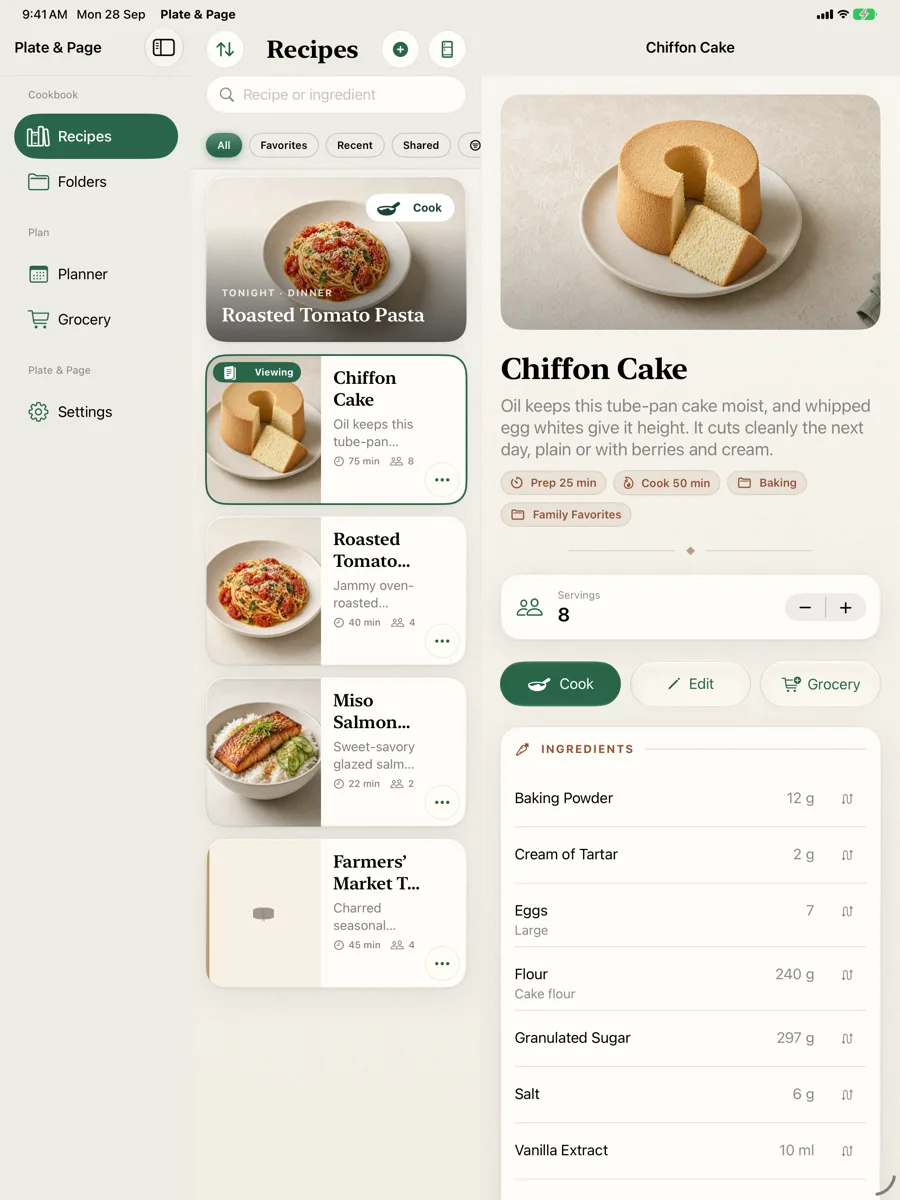
Plate and Page showing a recipe in its three-column iPad layout
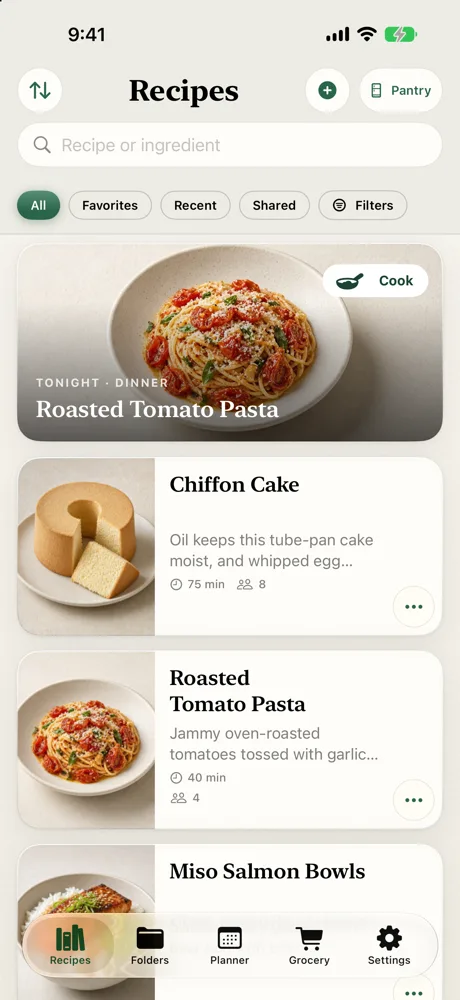
The Plate and Page recipe library on iPhone
One cookbookComfortable on every Apple screen.
From saved recipe to served dinner

Less kitchen admin. More good food.

Plate & Page connects the jobs that usually live in separate apps, browser tabs, notes, and scraps of paper.

Bring every recipe home

Save the recipes you trust, then keep them organized your way instead of hunting through bookmarks at dinnertime.

  • Import websites, shared links, pasted text, photos of printed recipes from your library, and portable files on iPhone, iPad, or Mac
  • Review and edit every import before it joins your cookbook
  • Bring recipes over from Paprika, Mela or Crouton export files, with a preview of what’s added or skipped before anything is saved
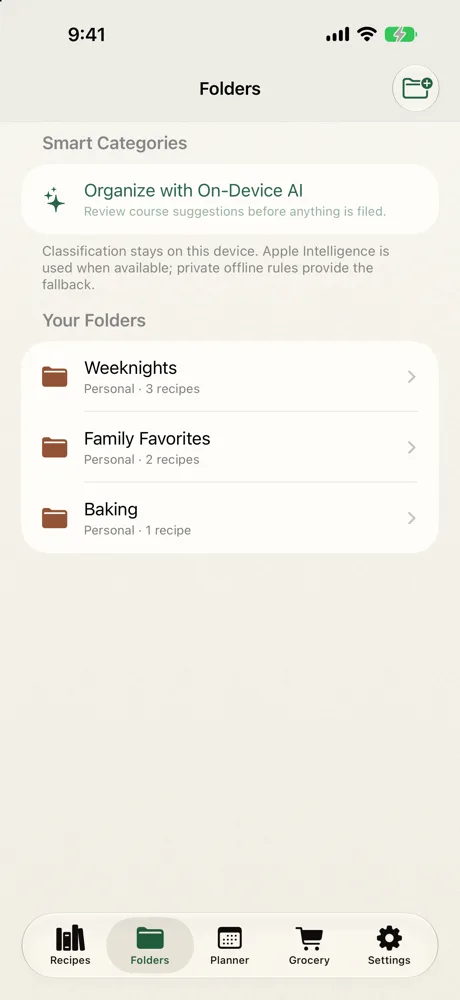
  • Use manual folders or approve suggested course categories Premium
  • Filter by diet or cuisine, exclude tagged allergens, and add your own nutrition values
Know what’s for dinner

Turn your own cookbook into a realistic week, built around the food you have and the meals you actually want.

  • See tonight’s planned dinner when you open the app
  • Rank recipes by what is already in your kitchen
  • Drag meals into breakfast, lunch, dinner, or other slots and move them between days Premium
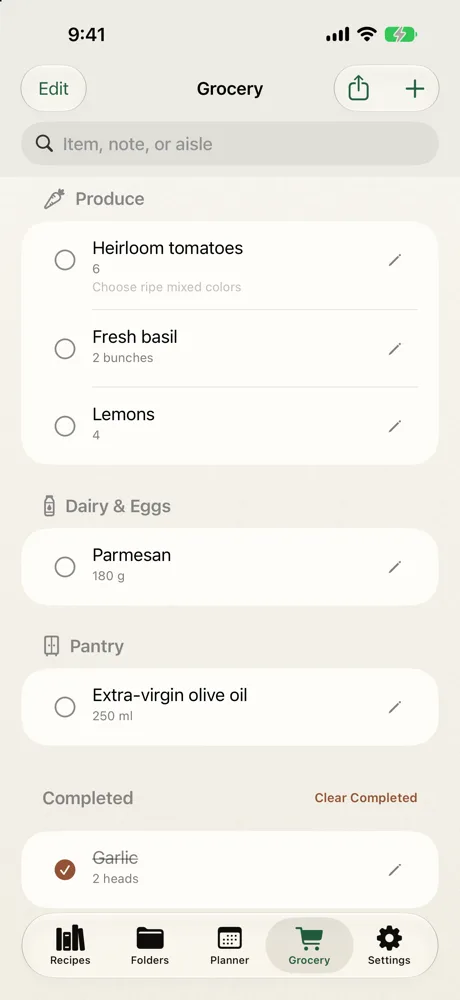
  • Search Grocery, switch Personal or Household scope, undo, and check items off from the widget

Meal planning and smart grocery building are part of Premium, a one-time purchase. The manual grocery list is free.

Cook without losing your place

When your hands are busy, the recipe gets quieter: one clear step, simple controls, and progress that survives interruptions.

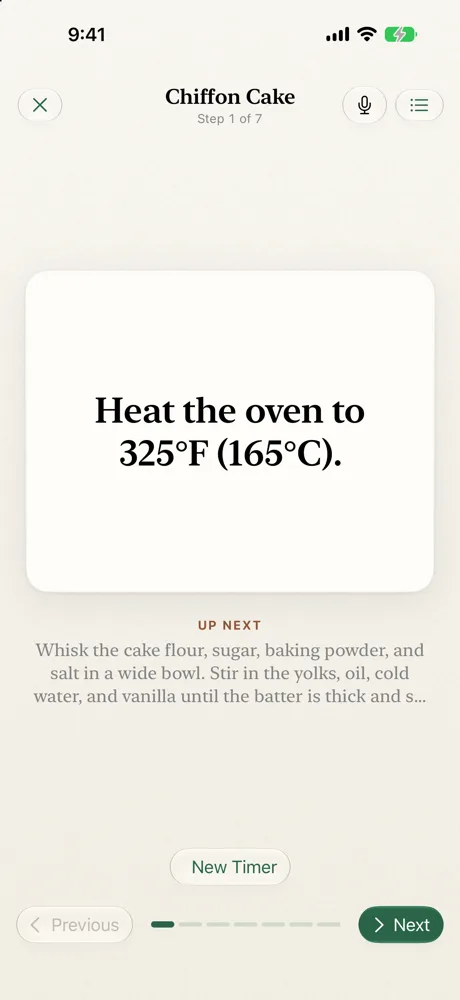
  • Swipe or say “next”, “back”, and “repeat”
  • Resume the exact step after an interruption
  • Start recipe or ad-hoc timers that stay visible across the app Premium
  • Get practical substitutions with ratios and technique notes
  • Review one leftover dish for Grocery or Pantry when you finish
Designed for the Apple ecosystem

One cookbook. Three native experiences.

Plate & Page doesn’t simply stretch an iPhone screen. It gives every device the layout it deserves, while your own iCloud keeps the cookbook together.

Plate & Page for iPad

Your whole cookbook in view.

Folders, recipes, and the full dish stay side by side. Browse, compare, and start cooking without losing context.

  • Spacious three-column navigation
  • Full recipe photography and ingredients at once
  • Touch, pointer, and keyboard-friendly controls
Plate and Page on iPad with folders, recipe cards, and a full recipe visible together
Plate & Page for Mac

Made for the Mac, not enlarged for it.

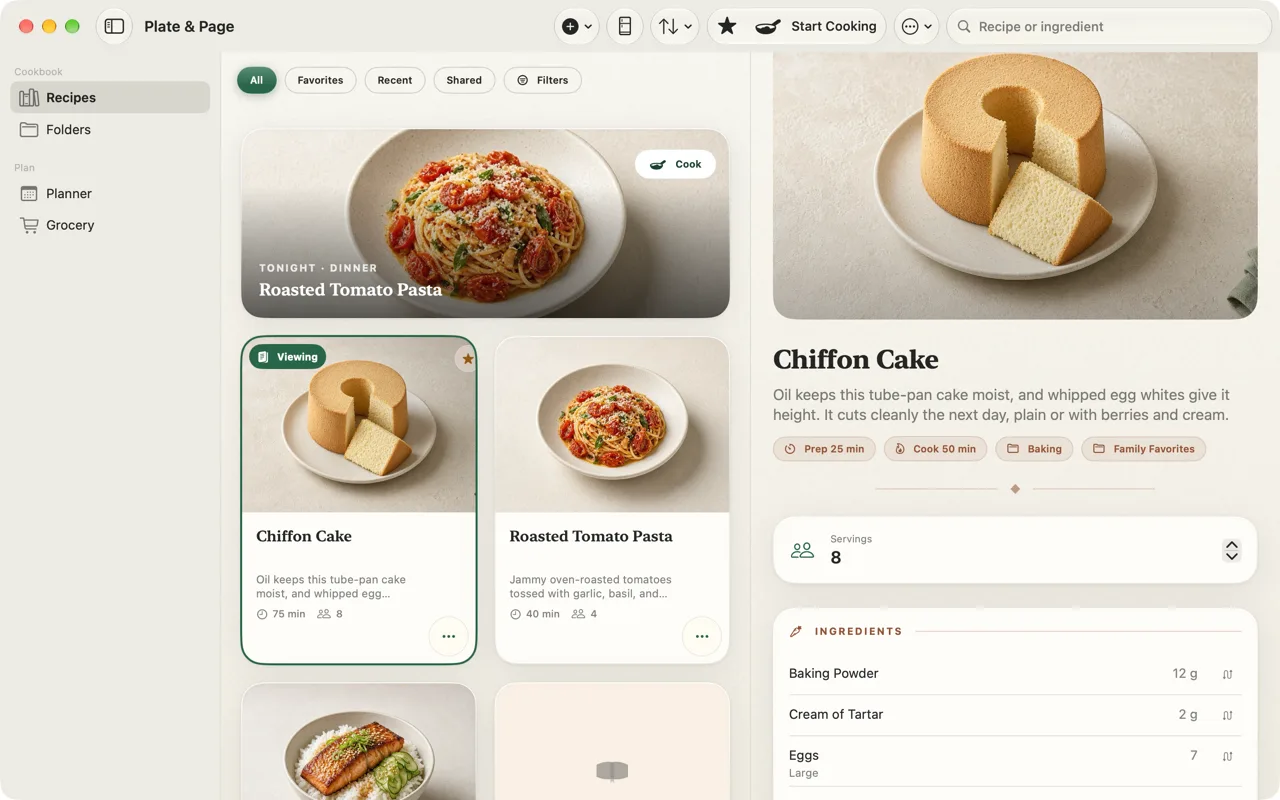
A focused desktop cookbook with room to browse, plan, and work from the recipe at the same time.

  • Native sidebar and three-column workspace
  • Focus view on iPad and Mac: hide the recipe list to read one recipe full width. On iPad, tap Hide Recipe List in the recipe’s toolbar; on Mac, choose View › Hide Recipe List or press Option-Command-L.
  • Double-click a recipe to open it in its own window
  • Keyboard shortcuts for Recipes, Folders, Planner, and Grocery
  • Share recipes in from Safari, Photos, and other Mac apps
  • Your iCloud cookbook connected in the sidebar
⌘ shortcutsMulti-window ready
Plate and Page recipe library and recipe detail on Mac
Always within reach

A complete kitchen companion in your pocket.

From the first saved recipe to the last checked grocery item, the everyday details stay close and clear.

Manual folders and reviewable on-device recipe organization
Your folders, plus smart
categories you approve.
The grocery list, grouped by aisle
Search, scope, and undo in
one aisle-sorted list.
Guided cooking mode, one step at a time
Swipe, speak, or resume —
your cooking place is kept.
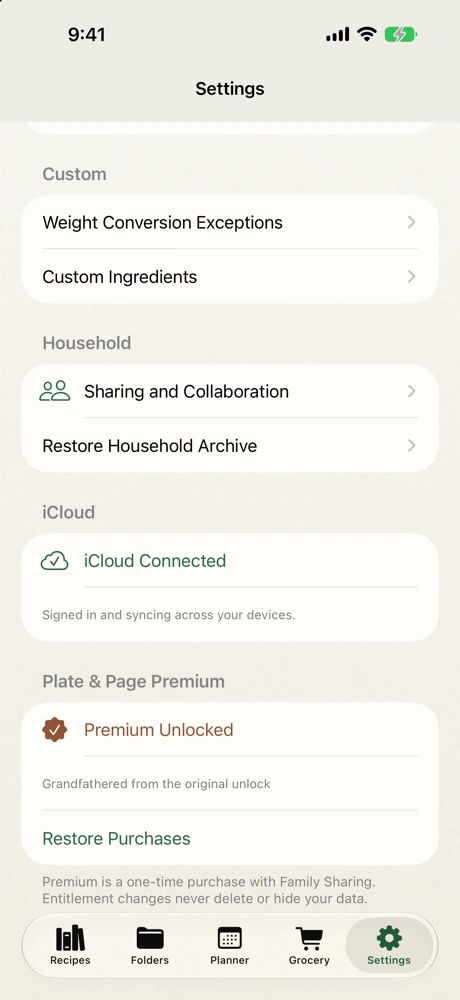
Plate and Page showing a verified iCloud Connected status
Your cookbook, signed in
and syncing through iCloud.
Useful, private, reviewable

AI that helps — and shows its work.

On supported devices and system versions, Plate & Page uses on-device Apple Intelligence for recipe drafting, ingredient help, and cookbook organization, and treats it the way a good sous-chef should be treated: helpful, transparent, and never in charge.

  • Anything AI-drafted is labeled, and always opens for your review before it is saved.
  • When Apple Intelligence is unavailable, imports and organization use editable private fallbacks instead.
  • Course categories are proposals, not commands: edit every assignment before applying it, and keep manual folders untouched.
  • Rankings and grocery math are plain, explainable logic — the model never decides silently.
  • Cuisine, diet and allergens stay user-entered. When a recipe has no nutrition values, Plate & Page can estimate calories, protein, carbs, fat and fiber per serving from your ingredients. Nutrition estimates are calculated on your device from USDA values, never by AI. They’re labeled as estimates, and values you enter or import always come first.
  • Optional image creation stays inside Apple’s Image Playground experience, which may use Private Cloud Compute; Plate & Page operates no AI server and receives only the image you approve.
Kitchen guides

Get more from the recipes you love.

Free tool: cups to grams by ingredient

No subscriptionPremium is one purchase, with Family Sharing
No accountYour recipes sync through your own iCloud
No adsAnd no trackers, in any part of the app
Free to exploreThree starters, five recipes you create, and three reviewed imports
Before you download

Questions, answered

Is Plate & Page free?

Plate & Page is free to download. The free edition includes three starter recipes, five recipes you create and three reviewed imports, plus scaling, unit conversion, a manual grocery list, export, iCloud sync and Cooking Mode.

Is Premium a subscription?

No. Premium is a one-time US$9.99 In-App Purchase with Family Sharing. It removes the recipe and import limits and unlocks folders and organization, weekly meal planning, smart grocery building, cooking timers and household sharing.

Does it work on iPhone, iPad and Mac?

Yes. One App Store listing covers iPhone, iPad and Mac. It requires iOS or iPadOS 18 or later, or macOS 15 or later, and your cookbook syncs through your own iCloud.

Can I save recipes from websites?

Yes. Share a recipe page from Safari or paste its link, and Plate & Page turns it into a draft you review before saving. You can also paste text, use up to eight photos from your photo library, or open .platepage files.

Do I need an account?

No. There’s no Plate & Page account, no ads and no tracking. Recipes stay on your devices and in your own iCloud.

Does Plate & Page use AI?

On supported devices, on-device Apple Intelligence can help draft recipes and suggest course categories. Anything AI-drafted is labeled and opens for your review. Nutrition estimates are calculated on your device from USDA values, never by AI.

Your new kitchen rhythm

Make “what’s for dinner?” the easy question.

Start with three built-in recipes, create five of your own, and save three reviewed imports. Upgrade once when your cookbook is ready to grow.

Download on the App Store

Free to start · five recipes and three reviewed imports free · Premium is a one-time US$9.99, with Family Sharing

Get Plate & Page: free on the App Store