A recipe app made for the Mac
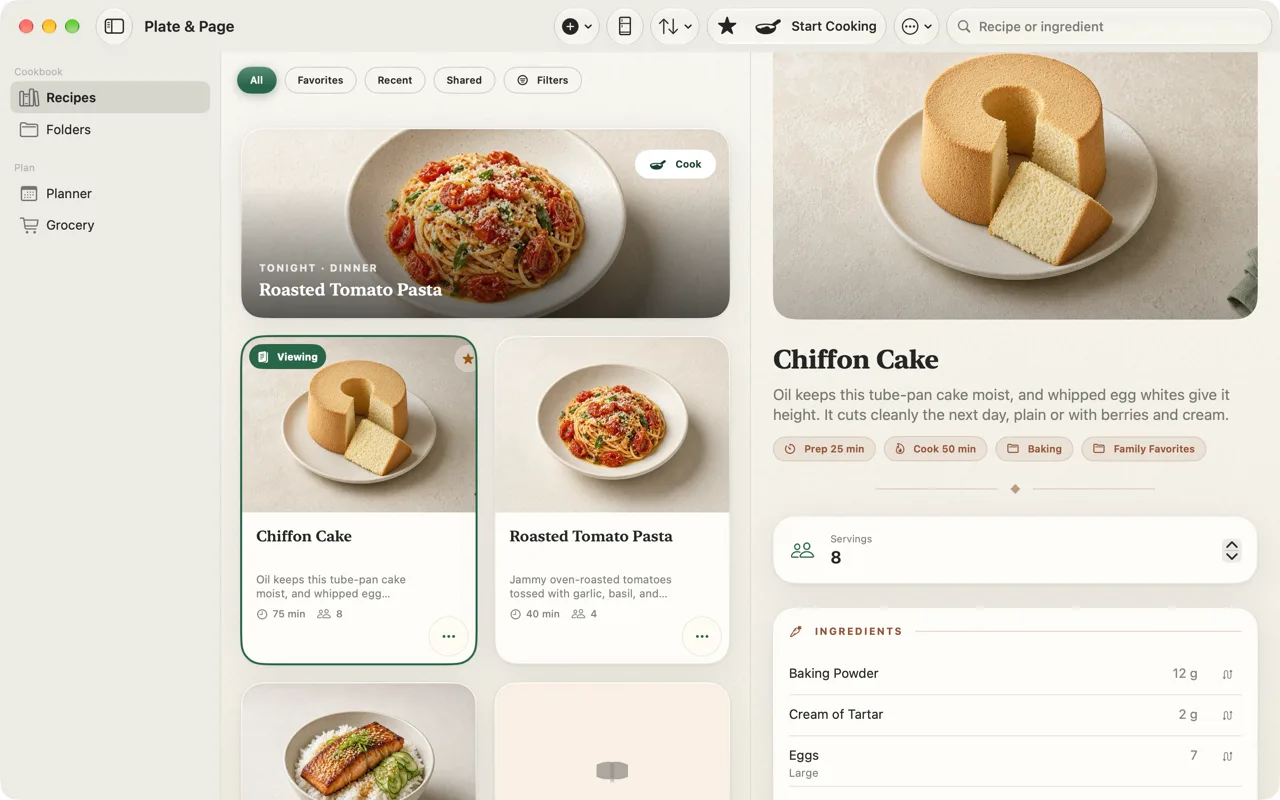
Plate & Page is made for the Mac, not enlarged for it. It’s a native recipe keeper and meal planner with a real sidebar, a three-column workspace and keyboard shortcuts, and the same purchase covers your iPhone and iPad.
Free to start · five recipes and three reviewed imports free · Premium is a one-time US$9.99, with Family Sharing
Plate & Page gives each device the layout it suits, and keeps one cookbook in sync between them through your own iCloud. It requires macOS 15 or later. This page covers what that means day to day, from saving recipes while you browse to planning the week on a big screen. For the full tour of features on every device, see the Plate & Page home page.
A real Mac layout
On the Mac, Plate & Page uses a native sidebar and a three-column workspace: your folders on the left, the recipes in the middle, and the full recipe on the right. You can browse a folder, compare two versions of a dish and read the whole method without anything covering anything else. Your iCloud cookbook is connected right in the sidebar, and the app is ready for more than one window when you want a recipe open beside your plan.
Keyboard shortcuts
If you live on the keyboard, you don’t have to reach for the trackpad to move around your cookbook. Plate & Page has keyboard shortcuts to jump between Recipes, Folders, Planner and Grocery, and to start planning a meal. In Cooking Mode on Mac, the arrow keys move between steps.
Save recipes while you browse on the Mac
Most recipe hunting happens in a browser, and the Mac is where many people do it. When you find a recipe in Safari, use the Share button and choose Add to Plate & Page. It works from Photos and other Mac apps too, with links, text and images. If you have a link copied, choose File › Import Recipe… and paste it.
Every import opens as a draft for you to review before it’s saved, which is easy to do with the original page open next to it. Plate & Page reads the structured recipe data most sites publish, and falls back to the page text where there isn’t any. The guide on how to save recipes from any website walks through each method.
Plan the week on a big screen, shop from your phone
A week of meals is easier to plan when you can see all of it. On the Mac, each day gets its own column in the planner, with breakfast, lunch, dinner and other slots. Drag recipes onto the week, copy last week’s meals, or let Plate & Page draft a week from your own cookbook for you to review.
Then build one combined grocery list, grouped by aisle. It syncs through iCloud, so the list you built at your desk is on your iPhone at the shop. Meal planning and smart grocery building are part of Premium; the manual grocery list is free. The guide shows how to plan a week and build your grocery list.
Cooking from the Mac
If your Mac lives in or near the kitchen, Cooking Mode opens as a large sheet with one step at a time in large type, a list of the ingredients that step uses, and the full ingredient list one click away. Plate & Page keeps the Mac from going to sleep while Cooking Mode is open, and remembers your step if you close it and come back.
Voice commands in Cooking Mode are available on iPhone and iPad, not on Mac. On the Mac, use the arrow keys or click Next and Previous. Scaling works the same on every device, so you can scale a recipe and convert cups to grams at your desk before you start.
Apple Intelligence on Mac
On a supported Mac with macOS 26, Plate & Page uses on-device Apple Intelligence to help draft recipes, for example from a dish you describe, match ingredients and suggest course categories for your cookbook. Anything AI-drafted is labeled and opens for your review, and nothing is filed without your approval. On other Macs, imports and organization use private, editable fallbacks instead, and nutrition is never estimated by AI.
Price
Plate & Page is free to download, with three starter recipes, five recipes you create and three reviewed imports. Premium is a one-time US$9.99 In-App Purchase with Family Sharing, and it covers the Mac, iPhone and iPad version alike, because they’re one App Store listing. There’s more on what’s free and what Premium adds in a recipe app with no subscription.
Coming from another Mac recipe manager? The Paprika alternative page compares the two using details from Paprika’s own site.
Questions
Which macOS version do I need?
macOS 15 or later. Apple Intelligence features need macOS 26 on a supported Mac.
Does it sync with my iPhone and iPad?
Yes. Your cookbook syncs through your own iCloud, and one App Store listing covers iPhone, iPad and Mac.
Can I save recipes from Safari on Mac?
Yes. Share the page to Plate & Page or paste its link, then review the draft before saving.
Does voice control work on Mac?
Voice commands in Cooking Mode are available on iPhone and iPad. On Mac, Cooking Mode shows one step at a time in large type and keeps the screen awake.